How to Read a FedEx Invoice Line by Line
Work through the invoice summary, shipment detail, surcharges, and adjustments in that order to catch billing errors fast. Then match each charge back to your own shipment record before the dispute window closes.
What does a FedEx invoice show, line by line?
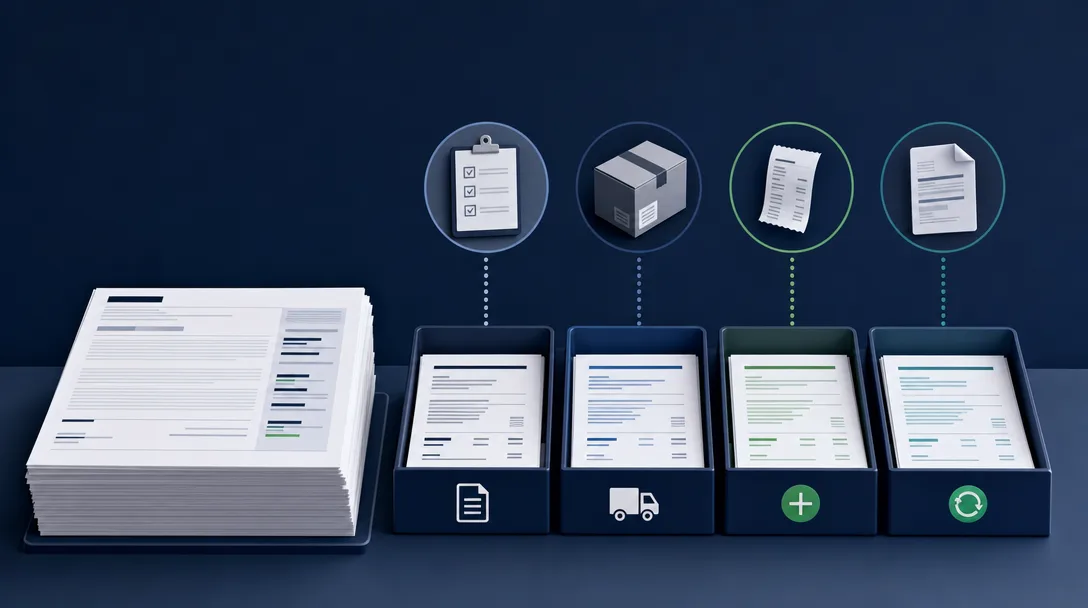
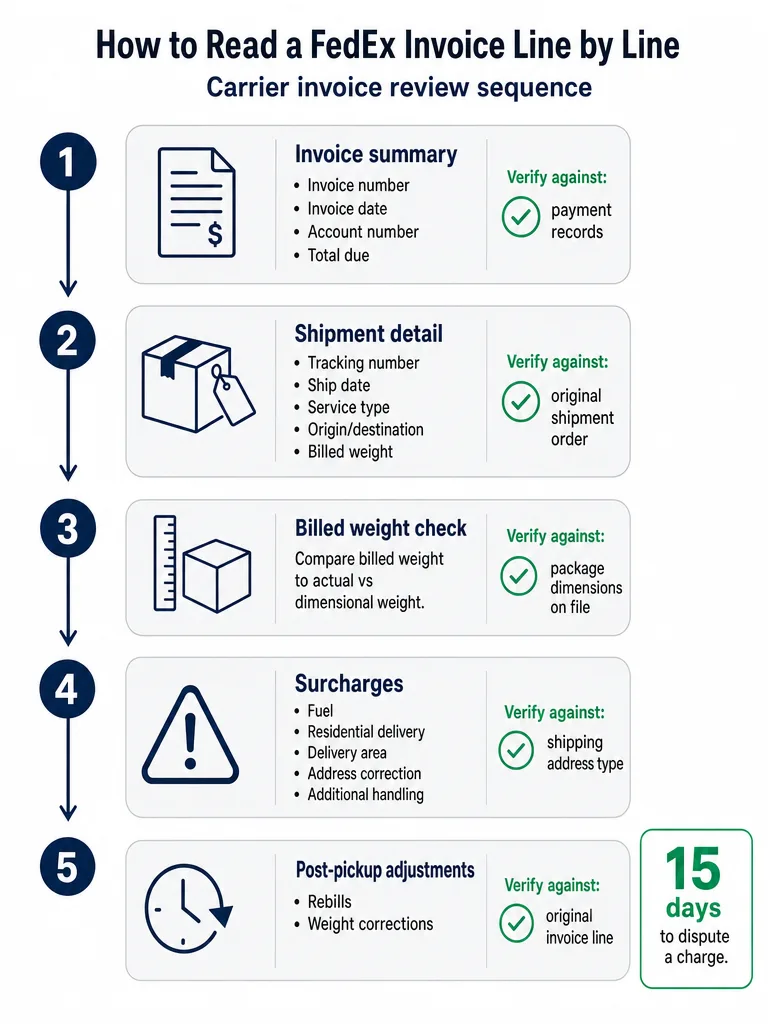
Reading a FedEx invoice means working through four fixed blocks in order: invoice summary, shipment detail, surcharges, and adjustments. That sequence catches billing errors fastest, because each block answers a different question: what you owe, what shipped, what got added on, and what changed after pickup.
The invoice summary sits at the top and totals what's due. Shipment detail lines sit below it, one block per package, showing what moved and what FedEx charged to move it. Surcharges attach to each shipment line and are where most disputable charges hide. Adjustments show up last, sometimes on a later invoice than the original shipment, and cover corrections FedEx made after the package was already picked up.
A quick comparison of the summary total against last month's number catches an obvious double bill, but it misses a residential surcharge applied to a commercial address or a dimensional-weight correction that posts two invoices after the shipment date. Working through all four blocks, instead of just the bottom line, is the difference between glancing at a bill and actually auditing one.
Where do the invoice number, account number, and total due appear?
Four identifying fields anchor the top of every FedEx invoice: invoice number, invoice date, account number, and balance due, with the payment due date sitting just below, according to FedEx's Billing Online documentation.
That page also breaks the total down by service rather than folding everything into one number. FedEx's Billing Online documentation separates total FedEx Express charges, total FedEx Ground charges, and total Other Charges due into their own lines. That split lets you confirm the Ground spend on an invoice matches your Ground volume for that billing period, without opening every shipment line first.
The same summary view is the jumping-off point for invoice history: payment status, disputes filed, and adjustment activity all sit behind the account number shown here, which is why it's worth confirming that number matches the account you're actually reviewing before you check anything else.
What do the shipment detail lines show for each package?
Each shipment gets its own detail line on a FedEx invoice, built from six fields: tracking number, ship date, service type, origin and destination, billed weight, and the base transportation charge FedEx applied before any surcharge, according to ShipSherlock's review of FedEx invoices. A shipment detail block repeats once per package, so, as an example, an invoice covering 40 packages shows 40 of these blocks stacked underneath the summary.
Service type is the field most worth double-checking. FedEx bills differently depending on whether a package moved as FedEx Express, FedEx Ground, FedEx Home Delivery, FedEx SmartPost, or FedEx Ground Economy, and each carries its own base rate structure. A shipment booked as FedEx Ground that somehow bills as FedEx Express, or a residential delivery that posts as FedEx SmartPost when you shipped it as Home Delivery, is a mismatch worth flagging before you compare it to anything else on the line.
Origin and destination determine the zone, which drives the base transportation charge before surcharges touch it. If the destination zip code on the invoice doesn't match your own shipment record, every downstream charge on that line, including the base rate itself, is built on the wrong number.
What is billed weight, and was it based on actual or dimensional weight?
FedEx bills the greater of actual weight or dimensional weight on every shipment, according to ShipSherlock's breakdown of FedEx invoice practices, so the billed weight on an invoice may not match what the package weighed on your scale. Dimensional weight is calculated from a package's length, width, and height, not what's inside it, which is why an oversized box with light contents can bill heavier than it weighs.
Comparing the billed weight on the invoice against the dimensions in your own shipment record, rather than just the weight written on the label, is the most reliable way to catch a dimensional-weight overcharge. As an example, if your record shows a package at 4 lbs actual weight but the invoice bills it at 7 lbs, the gap often traces back to box dimensions FedEx measured at the hub rather than a scale error on your end.
This is also where packaging choices start costing money before a single surcharge applies. A deeper breakdown of how DIM weight vs actual weight gets calculated, and how UPS, FedEx, and USPS apply it differently, is worth reading before you assume a billed-weight discrepancy is a mistake rather than a dimension problem.
Which surcharges appear on a FedEx invoice, and which ones deserve a second look?
FedEx itemizes surcharges under each shipment line instead of folding them into the base rate. ShipSherlock's breakdown of FedEx invoices names six surcharge types that show up this way: fuel, residential delivery, delivery area, additional handling, address correction, and seasonal demand. Each one is checkable against a different piece of your own shipment record.
| Surcharge | What it means | What to verify it against |
|---|---|---|
| Fuel surcharge | A percentage add-on tied to FedEx's published fuel rate, applied to the base transportation charge | The published rate for that week against the percentage actually billed |
| Residential delivery surcharge | Applied when the destination is coded as a home address | Whether the delivery address is actually residential, not a business location |
| Delivery area surcharge (DAS) | Applied to zip codes FedEx classifies as extended or remote delivery areas | Whether the destination zip code is genuinely on FedEx's DAS list for that service |
| Additional handling | Applied for packages FedEx flags as irregular in shape, weight, or packaging | Whether the package actually meets FedEx's irregular-dimension or weight criteria |
| Address correction fee | Applied when the address entered doesn't match FedEx's address database | Whether the original address was actually incomplete or just formatted differently |
| Seasonal demand surcharge | A temporary add-on during peak shipping windows | Whether the ship date actually falls inside the published surcharge window |
A full list of what changed for 2026, including rounding rules and cubic triggers, is in the 2026 UPS and FedEx surcharge list. For the residential-versus-commercial check specifically, see residential vs commercial surcharges.
What are adjustments and other charges on a FedEx invoice?
FedEx corrects shipments after the original pickup through adjustment lines, most often rebills, weight adjustments, and dimensional-weight corrections, according to ShipSherlock's walkthrough of FedEx invoices. Unlike the base charge and surcharges, which post at shipment time, these corrections can land on an invoice weeks later, carrying the same tracking number as a shipment you already reviewed.
That lag is exactly why adjustments need to be matched back to the original shipment record before you pay, not accepted just because they carry a familiar tracking number. A weight adjustment that bumps a package from 3 lbs to 6 lbs should correspond to an actual measurement discrepancy FedEx can point to, not an unexplained change. A rebill should reference the invoice it corrects, with a reason you can check against your own packing record.
Public documentation on exactly how a post-shipment address correction appears, whether as its own adjustment line or folded into the original shipment, is limited as of this writing. The FedEx address correction fee guide covers what typically triggers the fee and when it still hits an address that was correct to begin with.
Where do you find invoice history, disputes, and payment status in FedEx Billing Online?
FedEx Billing Online holds invoice and dispute history outside the PDF itself, and its closed-invoices view covers the last 180 days of billing, according to the FedEx Billing Online Plus user guide referenced by Refund Retriever. Finding a past invoice or checking dispute status means working inside the portal rather than digging through saved PDFs.
- Log into FedEx Billing Online and open the invoices view to see shipments billed under your account.
- Switch between open invoices and closed invoices. The closed view covers the last 180 days of billing history, including invoices already paid.
- Open the invoice you're reviewing to check whether a dispute you filed changed the balance due.
Public detail on the portal's exact sorting options and download controls isn't confirmed in the sources available for this piece as of this writing. FedEx's own Billing Online help pages on fedex.com are the place to verify those specifics before relying on them.
How long do you have to dispute a FedEx invoice charge?
ShipSherlock's breakdown of FedEx invoices puts the dispute window at roughly 15 days from the invoice date for invoiced shipments, and 15 days from the shipment date for anyone paying by credit card. That gap between the two triggers matters: a credit-card payor's clock starts running before the invoice even arrives.
A window that short is the real argument for reviewing invoices monthly instead of quarterly. If you only check FedEx invoices every three months, a billing error from month one is already outside the dispute window by the time you spot it in month three. The four-block check, summary, shipment detail, surcharges, adjustments, needs to happen on a schedule that fits inside that window, not after it.
FedEx's own published dispute policy wasn't accessible for this review, so confirm the exact window and filing process directly on fedex.com before a dispute deadline is close.
Which FedEx invoice abbreviations actually change what you owe?
Two different kinds of abbreviations show up on a FedEx invoice, and only one of them changes the dollar amount: billing-method codes describe who pays and how, while surcharge and service codes describe what was actually charged, according to Refund Retriever's guide to FedEx invoice abbreviations. Confusing the two means spending time investigating a label that never affected the bill.
| Abbreviation | What it means | Changes what you owe? |
|---|---|---|
| OB | Outbound shipment | No, it's a direction label |
| IB | Inbound shipment | No, it's a direction label |
| 3P | Third-party billing | No, it describes who pays, not the amount |
| RB | Rebill | No on its own, though the rebill amount attached to it does |
| FSC | Fuel surcharge | Yes, a percentage add-on to the base charge |
| DAS | Delivery area surcharge | Yes, a flat or tiered add-on by zip code |
| RES | Residential delivery surcharge | Yes, applied to home-address deliveries |
| ADR | Additional handling surcharge | Yes, applied to irregular packaging, weight, or dimensions |
| DIMS | Dimensional weight | Yes, can raise billed weight above actual weight |
Ground MWT is a separate category worth knowing: it refers to multiple-piece Ground shipments billed as a combined unit. Refund Retriever defines Ground MWT as shipments reaching a total weight of 200 lbs, typically made up of individual packages averaging 15 to 25 lbs each.
Frequently asked questions
How often should you review FedEx invoices to catch billing errors in time?
Review FedEx invoices monthly, not quarterly, because the dispute window is roughly 15 days from the invoice date, or 15 days from the ship date for credit-card payors, according to ShipSherlock's breakdown of FedEx invoices. Checking every three months means a billing error from month one is already outside the dispute window by month three. Working through the summary, shipment detail, surcharges, and adjustments on a monthly cycle keeps every charge inside that filing period.
What's the difference between FedEx Express and FedEx Ground charges on an invoice?
FedEx Express, FedEx Ground, FedEx Home Delivery, FedEx SmartPost, and FedEx Ground Economy each bill under a separate base rate structure, so the service type field on a shipment line decides which structure applies. A package booked as Ground that posts as Express, or a Home Delivery shipment billed as SmartPost, signals a mismatch worth flagging before comparing the charge to anything else on the invoice. Confirm service type against your own shipping record, not just the tracking number.
What is FedEx Ground MWT billing, and how does it affect what you pay?
Ground MWT bills multiple-piece FedEx Ground shipments as one combined unit once the total weight reaches 200 lbs, typically made up of individual packages averaging 15 to 25 lbs each, according to Refund Retriever's guide to FedEx invoice abbreviations. A shipment hitting that 200 lb threshold prices differently than the same packages billed one by one, so spotting the MWT code on an invoice flags a shipment structure, not a standard per-package surcharge.
What's the difference between a rebill and an adjustment on a FedEx invoice?
A rebill corrects an earlier invoice and should reference the original invoice it's fixing, while an adjustment covers post-shipment corrections, most often weight changes or dimensional-weight recalculations, that FedEx applies after pickup, according to ShipSherlock's walkthrough of FedEx invoices. Both can carry the same tracking number as a shipment you already reviewed, so match each one back to your packing record before paying rather than accepting it because the tracking number looks familiar.
How can you tell if FedEx wrongly charged a residential surcharge on a business address?
A residential surcharge on a business address is usually a default miscoding rather than a real residential delivery, and it can repeat across every shipment to that address until someone flags it. Comparing the surcharge line against your own address records, rather than FedEx's classification, is the fastest way to confirm whether a storefront, warehouse, or office was wrongly coded as a home delivery. This is one of the more common recoverable errors on a FedEx invoice.
Where can you get a free audit of your FedEx invoices for billing errors?
Kadima Logistics offers a free FedEx invoice audit that reviews actual invoice data and returns a written savings analysis, without requiring you to switch carriers. The audit checks the same four blocks covered in a line-by-line review, summary, shipment detail, surcharges, and adjustments, for billing errors, misapplied surcharges, and off-benchmark rates. It gives businesses a second set of eyes on FedEx billing without adding staff time to the process.
Sources
- Understanding Your FedEx Invoicewww.fedex.com
- Understanding your FedEx invoiceswww.fedex.com
- Pay Invoicewww.fedex.com
- Invoices and Billing | FedEx Canadawww.fedex.com
- [PDF] Knowing Your Billing Matters - FedExwww.fedex.com
Keep reading

One short note, every other Tuesday. Nothing else.
The patterns we're seeing across thousands of carrier invoices, written up tight. Unsubscribe with one click.