SFP Delivery Promises: Test Your Carrier Mix Before Expanding Coverage
Test each proposed lane against Amazon requirements and carrier terms. Compare invoice-based costs per shipment before expanding coverage.

What should you check about SFP delivery promises before expanding coverage?
Amazon reviews Seller Fulfilled Prime performance weekly, so check three things before widening coverage: your SFP performance dashboard, shipment records with promised versus actual delivery scans, and current carrier terms for each added lane. Until those documents exist, any proposed carrier mix is unproven, and so are your SFP delivery promises there.
Seller Fulfilled Prime (SFP) is an Amazon program that lets you put Prime branding on listings for products you fulfill without Amazon. Amazon lets you choose which products to enroll, where to store inventory, and which Amazon-integrated shipping carriers to use. That flexibility is the reason to test before you expand. The program doesn't tell you which carrier mix will hold up in a new region.
Each document answers a different question:
- The dashboard is where Amazon directs enrolled sellers to monitor ongoing performance. It is a starting point, not proof that a new lane will work.
- Shipment records show, lane by lane, whether the promise you made matched the delivery scan.
- Carrier terms show whether the service you plan to use can do what you're promising.
The research behind this piece found no carrier-specific SFP eligibility rules, transit commitments, pickup cutoffs, or weekend schedules for UPS, FedEx, USPS, DHL, or Amazon Shipping. Those have to come from the carriers' own documents for the date you ship.
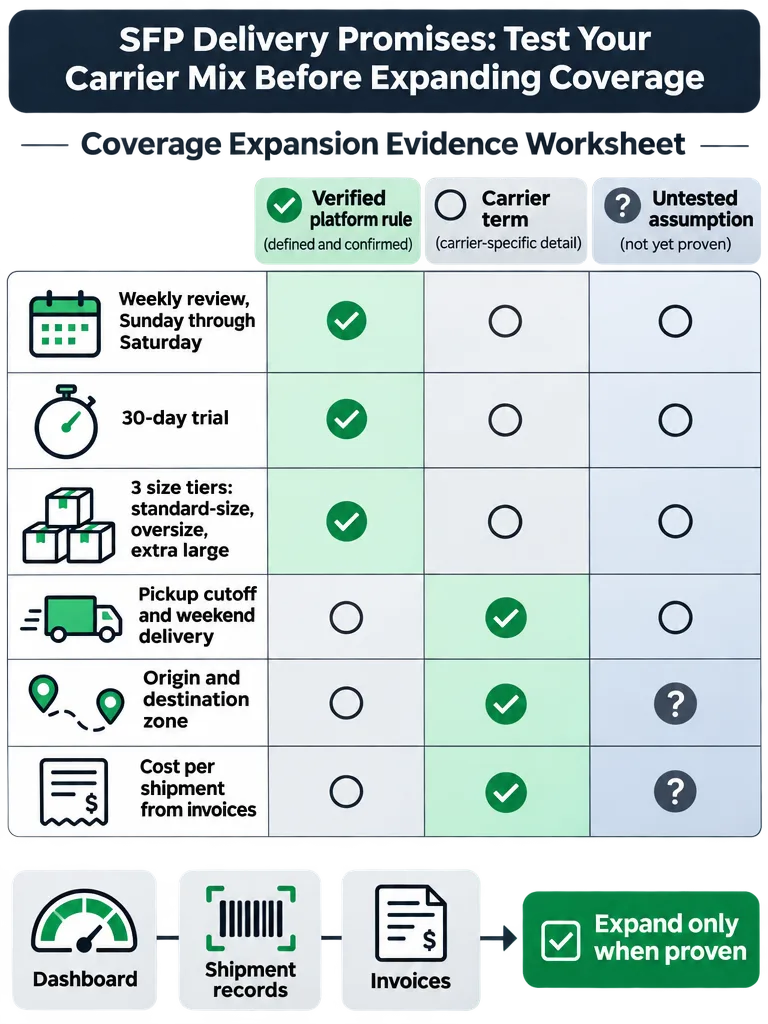
What are the Seller Fulfilled Prime requirements, and which numbers can you not verify?
Seller Fulfilled Prime requirements work in three stages: prequalify, pass a 30-day trial, then keep meeting enrollment standards. Amazon's program page names the performance inputs but gives no numeric on-time or tracking threshold that this research could confirm. Check the current figures in Seller Central.
What Amazon's program page confirms
- You need a Professional selling account and a domestic US address as your default shipping address.
- Prequalification looks at a minimum number of fulfilled packages and your late-shipment, valid-tracking, and cancellation performance.
- To pass the trial, Amazon says you participate for 30 days and meet all performance requirements.
- Amazon reviews enrolled sellers weekly, Sunday through Saturday. You get email notices for missed requirements, and ongoing failure may lead to disabled Prime offers and disenrollment. If you later prequalify again, you can start a new trial to re-enroll.
The trial and enrollment are different states. According to Amazon, during the trial you get a shipping template with one- and two-day delivery options, but your products receive no Prime branding until you pass and enroll. Those options are template choices, not evidence that a particular carrier or destination qualifies.
Are SFP delivery promises different for oversize or heavy products?
Seller Fulfilled Prime delivery speeds vary by product size tier, according to Amazon. The program has three tiers: standard-size, oversize, and extra large. Amazon tells sellers to consider each product's tier when choosing what to enroll and to confirm they can meet the expected delivery speeds for it.
That is why each tier needs its own test. A carrier mix that delivers standard-size parcels on time says little about extra large items, and a blended result can hide a weak tier behind a strong one. The sources reviewed contain no per-tier speed numbers, so pull those from Seller Central before you promise anything.
Box dimensions can also change what a carrier bills you. Check the applicable carrier's dimensional-weight terms, and compare them with the adjustments actually billed on your invoices for large cartons, before you price any oversize lane. For background, see how carriers charge DIM weight versus actual weight.
What goes on a carrier-mix worksheet before you expand SFP coverage?
A carrier-mix worksheet is a lane-by-lane record of each fact you need, where it comes from, what kind of evidence it is, and whether you have verified it. It is an editorial planning framework, not an Amazon requirement. Its job is to stop untested assumptions from passing as rules.
A four-step test sequence
- Define each proposed lane. Record the origin ZIP, destination zone, carrier and service, and size tier.
- Record the promise and the evidence. Note the delivery promise a customer would see and the actual delivery scans for comparable shipments.
- Model the same shipment set under the candidate terms. Use invoice lines for the current carrier and the proposed carrier's terms.
- Record expand or hold. Judge each lane against verified Amazon requirements first. Keep your own business criteria, such as the cost per shipment you can accept, in a separate, labeled column.
The research has no validated pilot length, sample size, or pass/fail method, so don't borrow one. If you set your own, label it as yours.
| Item to verify | Where the rule or data comes from | Evidence type | Verification status |
|---|---|---|---|
| Origin ZIP | Your ship-from addresses and shipment records | Shipment record | Open until matched to records |
| Destination zone | Carrier zone chart for each origin ZIP | Carrier term | Open until chart is attached |
| Carrier and service | Carrier service guide; Amazon-integrated carriers available to you | Carrier term | Open until guide is attached |
| Pickup cutoff | Carrier pickup schedule plus your own packing and handoff times | Carrier term and shipment record | Open until both are logged |
| Weekend pickup and delivery | Carrier service terms; current Amazon policy text | Carrier term (any Amazon rule unconfirmed) | Open until both are in hand |
| Promised vs actual delivery date | Promise shown to the customer vs carrier delivery scan | Shipment record | Open until scans are compared |
| Valid tracking scan | Amazon's valid-tracking metric; carrier scan data | Amazon requirement (threshold unconfirmed) | Open until Seller Central text is read |
| Size tier | Amazon's three size tiers | Amazon requirement | Open until each product is assigned |
| Cost per shipment | Carrier invoice lines for each shipment | Shipment record | Open until invoices are matched |
For every row, add four fields: the actual value, the exact evidence reference (document name and page, or invoice number), the effective date, and any unresolved assumption. A row is verified only when all four are filled.
One more check: how order cutoff times affect the delivery promise customers see is governed by Amazon's delivery-promise rules. The Seller Central speed report page supplied for this research contained no readable text, so this article states no rule. Verify the current rules in Seller Central.
How do you read your SFP dashboard and set daily Prime order limits?
The Seller Fulfilled Prime performance dashboard is where Amazon directs enrolled sellers to monitor ongoing performance. Read it against your own shipment log, then cap daily Prime volume at what you can reliably ship. Amazon recommends the Control Prime order volume option for same-, one-, and two-day orders.
- Open the Seller Fulfilled Prime performance dashboard. Amazon points enrolled sellers here to monitor ongoing performance.
- Check your business reports and Account Health dashboard. Amazon recommends these for identifying and understanding performance issues. If you aren't prequalified yet, they're also how you track progress.
- Match the weekly review to your shipment log. Amazon's review window runs Sunday through Saturday, so group your own records the same way and compare. This is also where you check each lane against actual scans, which the dashboard alone doesn't do for you.
- Set Control Prime order volume. Amazon's guidance is to set daily limits for same-, one-, and two-day orders that reflect the number you can reliably ship each day.
What happens when a weekly review finds a miss is covered in the requirements section above. The point of this routine is to catch the miss in your own log first.
What invoice evidence shows the real cost of serving more destinations?
The real cost of serving a new destination is your net cost per shipment on that lane, reconciled from carrier invoices rather than taken from a rate-card quote. Pull the same invoice lines for every lane you plan to add, then tie each one to a shipment record.
Invoice lines to pull per lane
- Base rate and the zone it was billed at
- Fuel surcharge
- Residential charge
- Delivery area surcharge
- Dimensional weight adjustments
- Address corrections, where they appear on your actual invoices
Before you call any figure "net," reconcile the quoted charges with the discounts, minimums, credits, and adjustments that apply. Then compare lanes using matched shipment profiles: the same size tier, a similar weight band, the same zone, and the same service.
Use this formula:
Relative shipping-cost change = (modeled net cost per shipment − current net cost per shipment) ÷ current net cost per shipment
The output is a relative change in shipping cost. It is not margin, and it doesn't prove which charge caused the change. If a new lane has no current baseline, record "no current baseline" and report the modeled cost alone.
Build the current-lane baseline first. The guide to the Seller Fulfilled Prime cost per order covers shipment records, invoice lines, packaging, and labor.
The sources reviewed contain no seller shipment data, negotiated rates, or margins, so this article can't substantiate a savings or margin result. Label anything you calculate as a modeled estimate until real shipments demonstrate it. Margin also needs your business costs and revenue, which no shipping invoice contains.
Do you need a warehouse to expand Seller Fulfilled Prime coverage?
No. Amazon states that you are not required to use warehouses for Seller Fulfilled Prime orders. Some sellers use storage space in their homes or third-party solutions, and you can store inventory wherever lets you meet the program's performance requirements.
Some third-party SFP guidance seen in search answers treats geographically spread facilities as a given. Amazon's page doesn't say that, and it doesn't establish nationwide coverage as a requirement either. The test is demonstrated delivery performance: do your scans show on-time delivery from where your inventory actually sits? A second facility may help on a particular lane, but your shipment records and invoices should show that before you pay for it.
Which missing documents should stop you from expanding SFP coverage?
Hold off on expanding SFP coverage if any of three document sets is missing: current Amazon policy text from Seller Central, carrier service terms for each new lane, or shipment and invoice evidence. Without them, worksheet rows stay assumptions, and an assumption is not a basis for new delivery promises.
Apply the worksheet lane by lane:
- No current Seller Central policy text: you can't confirm the thresholds, minimum packages, or tier speeds that apply to you. Hold every lane.
- No carrier terms for a lane: cutoffs, weekend schedules, and holiday exceptions stay guesses. Hold that lane.
- No promised-versus-actual scans or invoices for a lane: you can't show performance or cost. Hold that lane.
A lane moves to "expand" when its Amazon-requirement rows are verified with dated evidence, its carrier-term rows are backed by documents, and its cost per shipment meets the business criteria you set separately. Evidence that would change a hold decision includes a clean run of delivery scans on the new lane, carrier terms that support your cutoff and weekend promises, and an invoice-based cost per shipment you can live with.
This article confirms no Amazon thresholds or carrier rates beyond those cited. Check Amazon's requirements and each carrier's terms as they stand on the date you ship.
For the invoice-assessment step, Kadima Logistics offers a free shipping audit that produces a written savings analysis from your carrier invoices. To decide between an audit and a carrier switch, read when a third-party audit beats switching carriers.
Frequently asked questions
What does SFP mean on Amazon?
SFP stands for Seller Fulfilled Prime, an Amazon program that lets you put Prime branding on listings for products you fulfill without Amazon. To enroll, you prequalify on performance requirements, then complete a 30-day trial. Once enrolled, domestic Prime customers get fast, free delivery and free returns on your designated products.
What is the difference between FBA and Seller Fulfilled Prime?
With Fulfillment by Amazon (FBA), you send inventory into Amazon's network, and Amazon picks, packs, and ships orders. FBA products become Prime-eligible automatically. With Seller Fulfilled Prime, you store and ship products yourself, choose your own Amazon-integrated carriers, and must meet Amazon's performance requirements. Amazon still handles post-order customer service and returns on those orders.
Do you get the Prime badge during the Seller Fulfilled Prime trial?
No. The trial runs 30 days, and your products receive no Prime branding until you pass it and enroll. During the trial you get a shipping template with one- and two-day delivery options. To pass, you must meet all performance requirements for the full 30 days.
What happens if you miss Seller Fulfilled Prime performance requirements?
Amazon reviews performance weekly, Sunday through Saturday, and emails you about any requirement you miss. Ongoing failure may lead to disabled Prime offers and disenrollment. If you later prequalify again, you can start a new trial to re-enroll. Keeping your own shipment log helps you catch a miss before the weekly review does.
Why can a two-day SFP offer show customers a 3 to 5 day delivery promise?
Order cut-off times can stretch the promise. Amazon's speed report notes that an offer configured for one-day or two-day delivery can show customers a 3, 4, or even 5+ day promise because of cut-off times. Check the current cut-off rules in Seller Central, then compare the promise customers see with your actual delivery scans.
How do you keep Prime orders from exceeding what you can ship on time?
Use the Control Prime order volume option, which sets daily limits on how many same-, one-, and two-day delivery orders customers can place. Amazon says the limit should reflect the number of orders you can reliably ship each day. Track the results in your Seller Fulfilled Prime performance dashboard.
Sources
- sell.amazon.comsell.amazon.com
Keep reading


One short note, every other Tuesday. Nothing else.
The patterns we're seeing across thousands of carrier invoices, written up tight. Unsubscribe with one click.